
Setting up your creator store
Complete guide to customizing your store profile and information
Go to Your Store Page
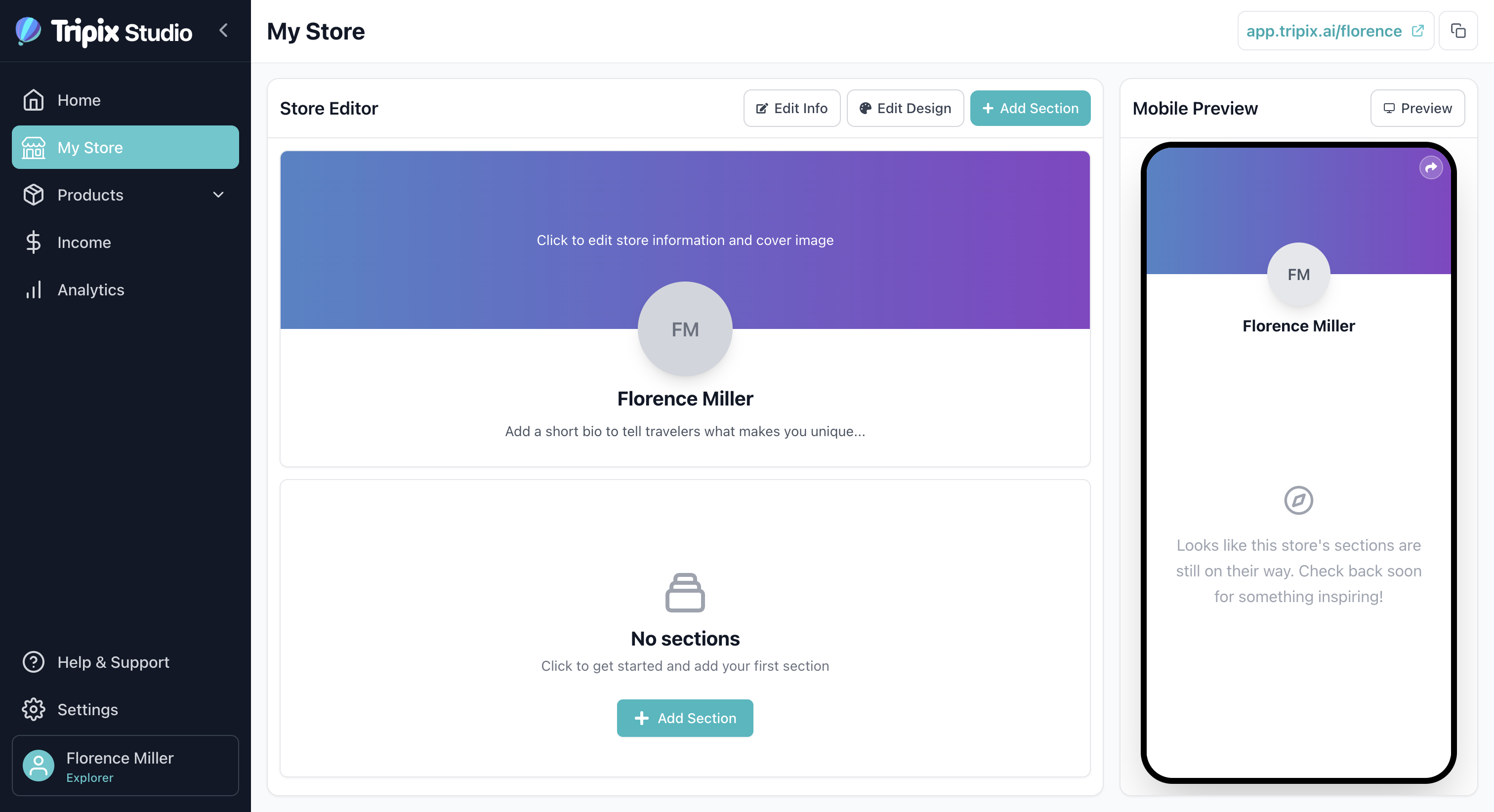
To start setting up your creator store, navigate to the "My Store" page. You can access it from the main navigation menu or sidebar in your Tripix dashboard.
When you first arrive at your store page, you'll see the default state of your store. This is your starting point for customization. Here's a quick overview of the key components you'll find on this page:
- Store Editor: This is where you can view, edit, remove, and reorder the store header and sections. It's your main workspace for building and organizing your store's layout.
- Mobile Preview: A live preview showing how your store currently looks on mobile devices. You can also switch to desktop preview mode to see how it appears on larger screens. This real-time preview helps you make design decisions with confidence.
Edit Your Store Information
To customize your store and make it truly yours, click "Edit Info" on the store page. This is where you can personalize all aspects of your store. Below is detailed guidance for each field:
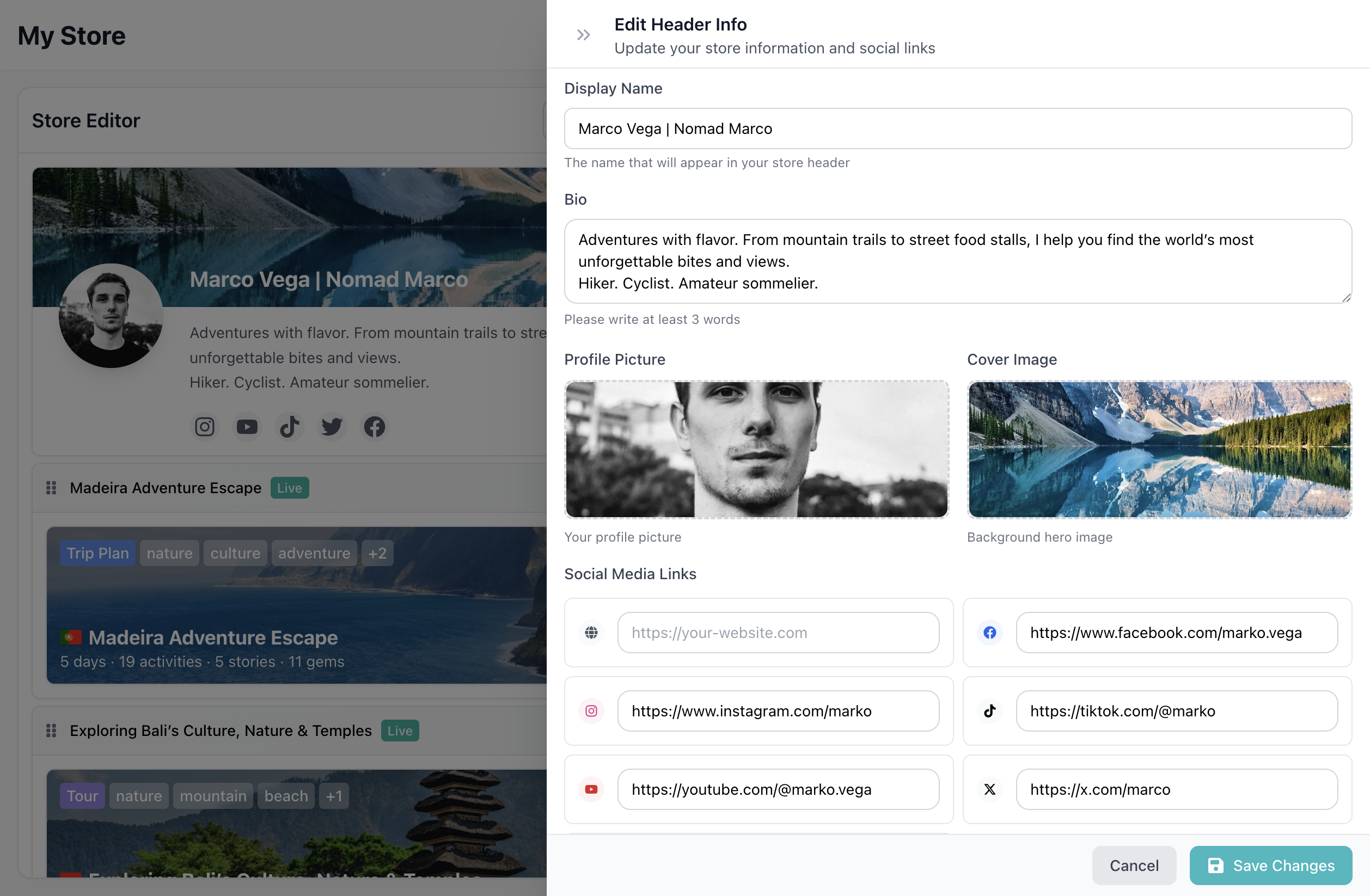
Display Name
The name that will appear in your store header. This can be different from your account name and should represent your brand. Choose a name that:
- Reflects your travel style or expertise
- Is memorable and easy to pronounce
- Matches the personality you want to convey to customers
- Can be your personal name, a brand name, or a combination
Bio
Your bio should tell your story and highlight your expertise. This is where visitors learn about you and what makes your travel guides special. Consider including:
- Start with your passion: What draws you to travel? Share what inspires you.
- Showcase expertise: Mention your specialties (destinations, travel styles, adventure types, etc.)
- Add credentials: Years of experience, languages spoken, certifications, or unique qualifications
- Include personality: Let your unique voice shine through - be authentic and relatable
- Call to action: Invite visitors to explore your products and discover amazing travel experiences
Keep it concise but compelling - aim for 2-4 sentences that capture your essence and expertise.
Profile Picture
Choose a clear, professional photo that represents you and your brand. Your profile picture is one of the first things visitors see, so make it count:
- Use a high-resolution image (at least 400x400 pixels for best quality)
- Ensure good lighting and a clean background
- Show your face clearly - personal connection matters in travel content
- Consider using a travel-related photo that reflects your brand and adventures
- Make sure the image is well-composed and professional, even if it's casual
- Update it periodically to keep your store fresh and current
Cover Image
Add a stunning cover image that sets the tone for your store and showcases your travel style. This large banner image appears at the top of your store and creates the first visual impression:
- Choose a high-quality, high-resolution image that represents your travel aesthetic
- Select an image that's visually striking and captures the essence of your brand
- Consider the composition - ensure important elements aren't covered by your profile information
- Use images that inspire wanderlust and reflect the destinations or experiences you offer
- Update seasonally or when you want to refresh your store's look
Social Media Links
Connect your social media accounts to build credibility and allow customers to see more of your content. Social media links help you:
- Build credibility through your existing content and following
- Allow customers to see more of your travel content and get to know you better
- Create a cohesive brand presence across platforms
- Drive traffic between platforms and grow your audience
- Showcase your expertise through your social media portfolio
Include links to platforms where you're most active and where your travel content shines - whether that's Instagram, TikTok, YouTube, a blog, or other platforms.
Take your time to fill out these details thoughtfully - they're the first impression visitors will have of your store and can significantly impact your sales. You can always come back and update any of these fields as your brand evolves.
💡 Pro Tip
Take your time to fill out these details thoughtfully - they're the first impression visitors will have of your store and can significantly impact your sales. You can always come back and update any of these fields as your brand evolves.
Customizing your store's design
Learn how to customize your store header, sections, and desktop design to match your brand